
How to Get Internet in China
A working internet setup in China has three separate pieces: mobile data, a phone number for verification, and access to overseas services. A travel eSIM or roaming can get you online quickly after landing, a local SIM gives you a mainland Chinese number, and a VPN is only useful after you already have a working connection.
Difficulty
Easy
Time needed
15-30 minutes before travel, 20-45 minutes for a local SIM
Updated
May 15, 2026

Start here
Quick answer
- For most short-term visitors, the safest first move is to install a China/HK/Asia travel eSIM before arrival or keep home roaming active for the first day. This gives you data immediately for maps, translation, payment troubleshooting, hotel contact, and ride-hailing.
- If you need food delivery, local app verification, school/work contact, apartment services, or a longer stay, get a mainland local SIM from an official China Mobile, China Unicom, or China Telecom store with your passport.
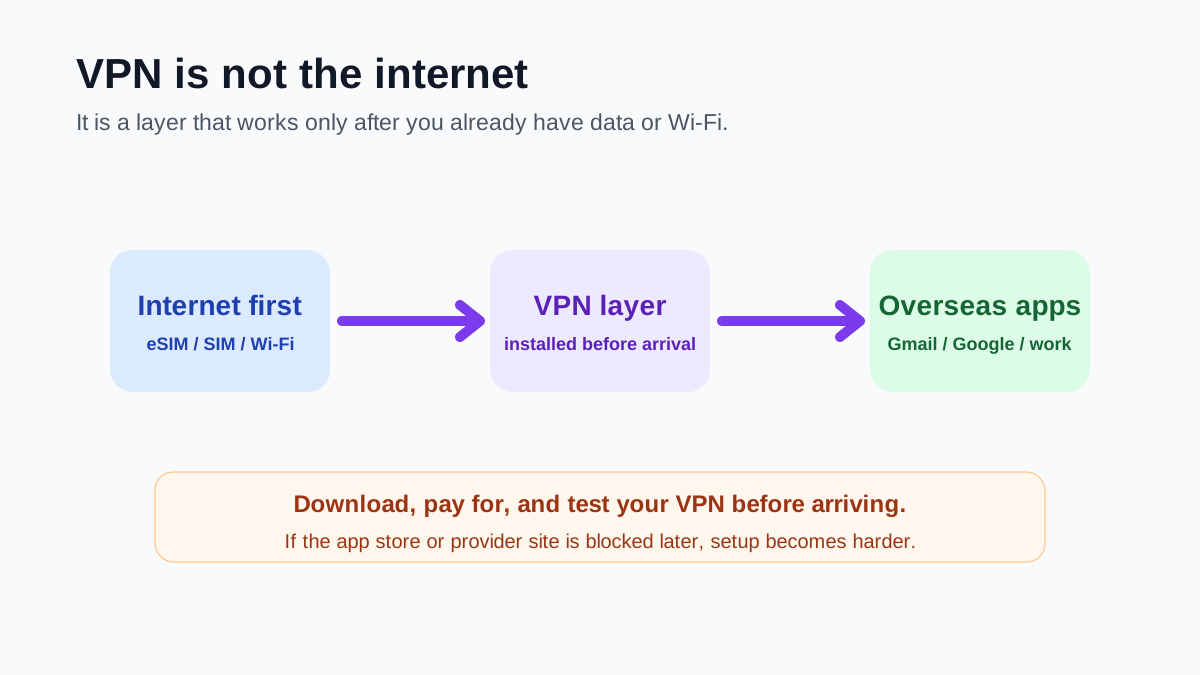
- If you need Google, Gmail, WhatsApp, Instagram, YouTube, Slack, or overseas work tools on local SIM or local Wi-Fi, download and test a VPN before entering mainland China. A VPN is not a connection by itself; it needs eSIM, roaming, SIM data, or Wi-Fi underneath.
Requirements
- Required: unlocked phone, or eSIM-capable phone if you plan to use eSIM.
- Required: one arrival backup such as travel eSIM, home roaming, airport pickup Wi-Fi, or hotel Wi-Fi details.
- Required for local SIM: physical passport for real-name registration at an official carrier store or airport counter.
- Recommended: keep your home SIM active for bank, email, Apple/Google, Alipay, WeChat, and card-issuer SMS codes.
- Recommended: download VPN, maps, translation, Alipay, WeChat, Amap, and hotel booking apps before arrival.
- Recommended: save hotel address in Chinese and screenshot key booking/payment details while still online.
Visual manual
Step-by-step guide
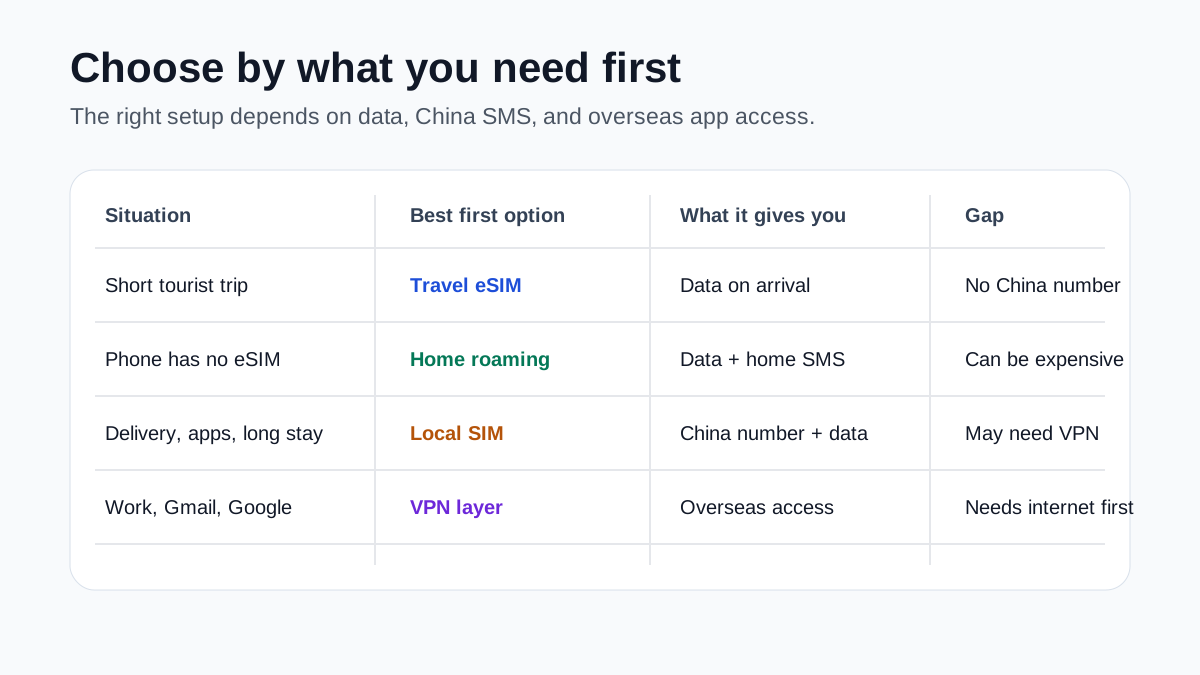
Start with the decision: data, China number, or overseas apps
Before buying anything, decide what you actually need. A travel eSIM or roaming is best for instant data and often works well for overseas apps. A local SIM is best when you need a mainland Chinese phone number for SMS verification, delivery calls, local accounts, and longer stays. VPN is a separate access layer for overseas services when you are using local networks.
User-reported pattern: many visitors buy only eSIM and later discover they still need a China number for Wi-Fi login, delivery, or local app verification.
Prepare before flying
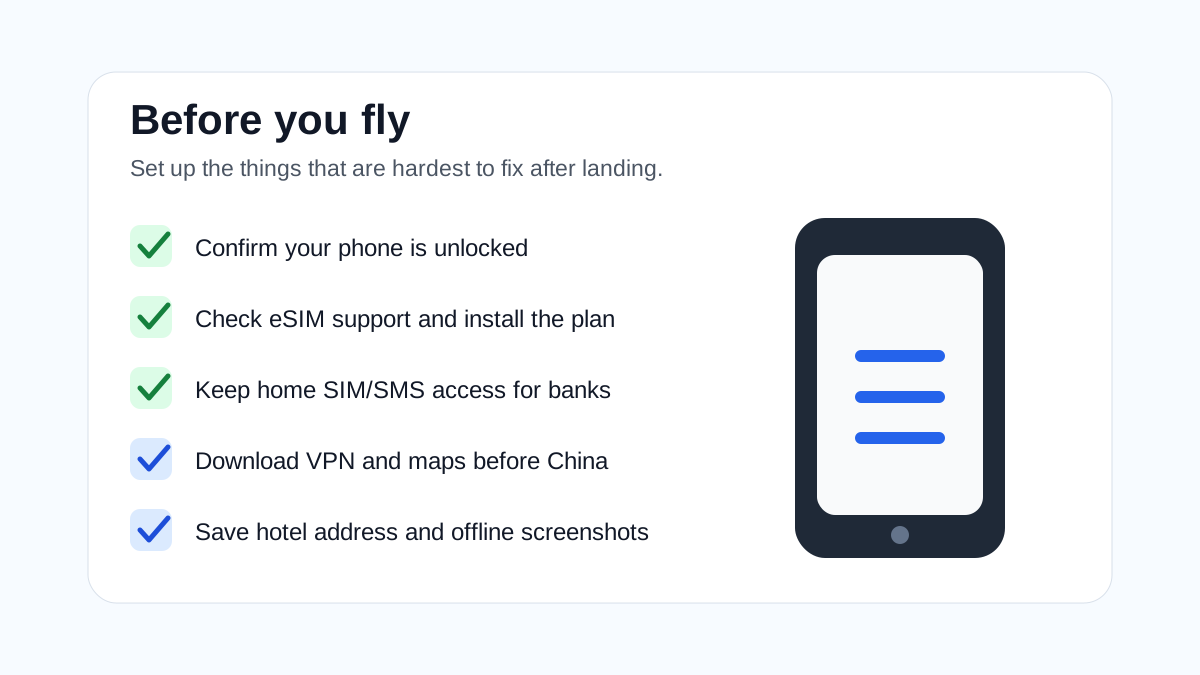
Do the hard setup while your normal internet still works. Confirm your phone is unlocked. Check eSIM support. Turn on or understand roaming for your home SIM. Install the eSIM but do not activate it too early if the plan starts on activation. Download and pay for VPN before China if you need it. Save offline maps, your hotel address in Chinese, and key booking screenshots.
Manual check: eSIM activation timing varies by provider, so the user must follow the provider's exact instructions.
Use eSIM or roaming for arrival internet
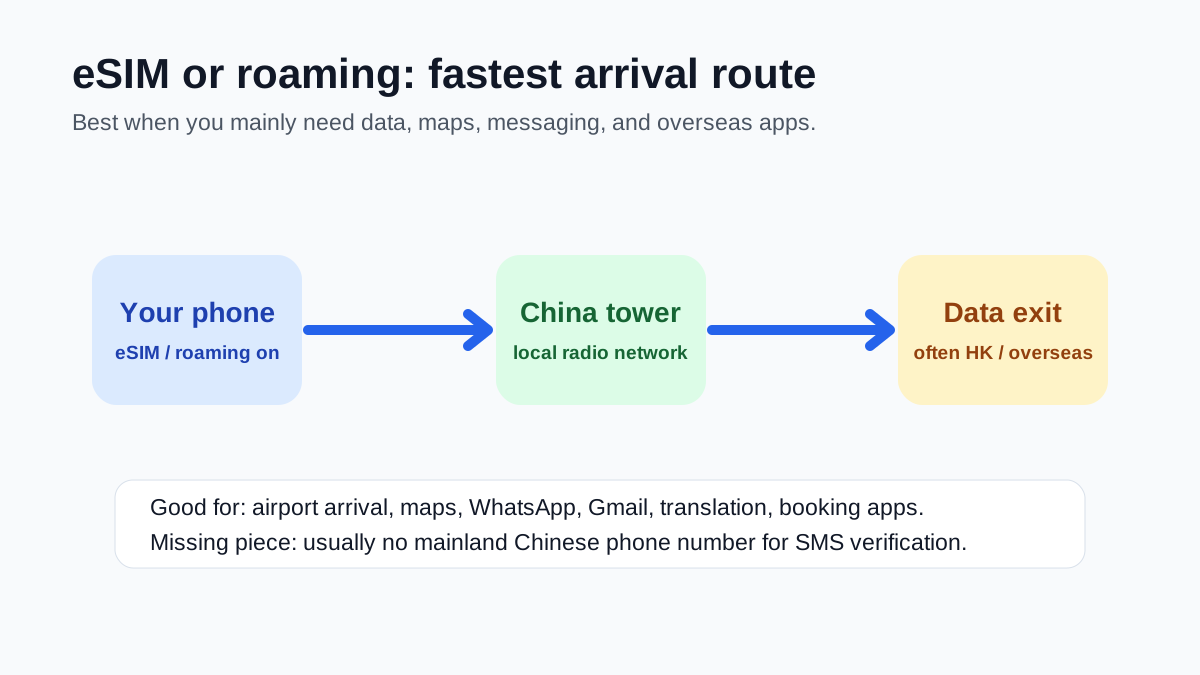
For a tourist trip, eSIM or home roaming is usually the fastest way to land with data. Turn on the correct data line, enable data roaming for the eSIM/roaming plan if required, and test maps, translation, hotel messages, and payment apps. Many internationally routed eSIM/roaming products can access overseas services more easily than a mainland local SIM, but performance and routing vary by provider.
User-reported only: many Reddit travelers say eSIM data works for Google/WhatsApp without VPN, but results vary by provider and plan.
Get a local SIM when you need a mainland number
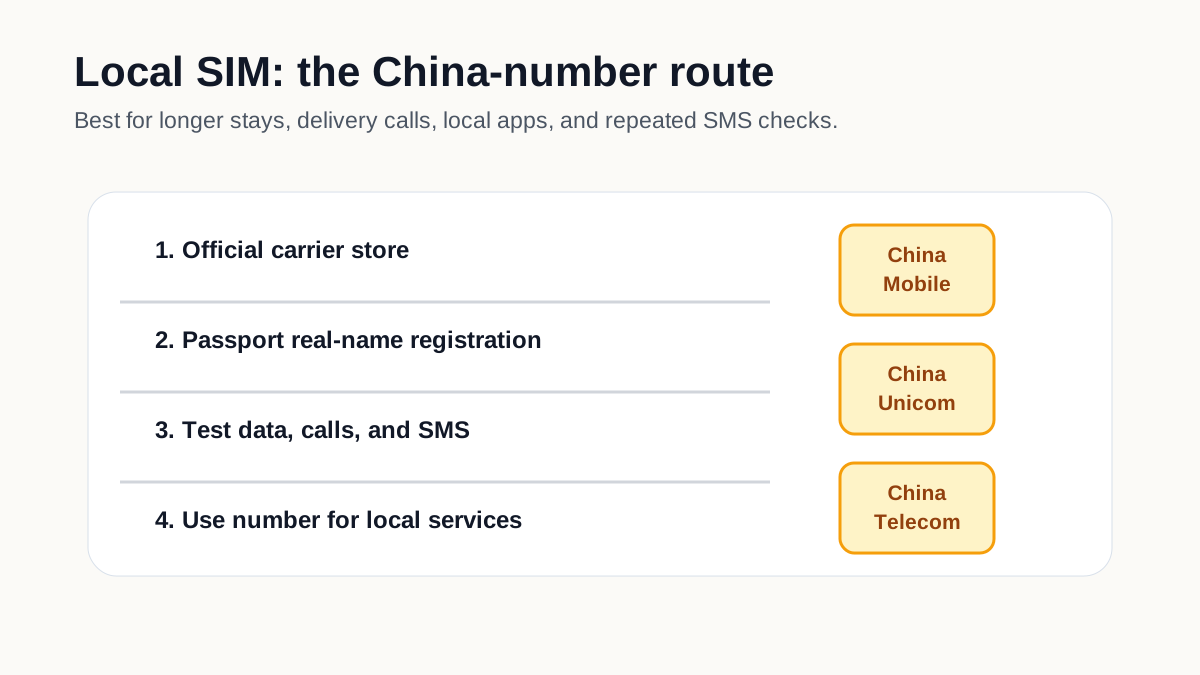
A local SIM is useful for delivery calls, ride-hailing contact, some local app registrations, Wi-Fi SMS login, longer stays, school, work, and local customer service. Official city and government guidance says foreigners can bring a passport or Foreign Permanent Resident ID Card to telecom operator service offices such as China Mobile, China Unicom, or China Telecom to apply for a SIM card and activate mobile services. Test data, calls, SMS, and your number before leaving the counter.
Officially supported, but store experience varies. Larger city stores and airport service counters are often easier for foreigners.
Add VPN only after you have working internet
If you use local SIM data, hotel Wi-Fi, office Wi-Fi, or cafe Wi-Fi, some overseas apps and websites may not load without a VPN or other approved company access method. Install and test VPN before arrival because provider sites and app stores may be harder to reach later. Keep in mind that VPN reliability changes, especially around major events or network changes.
We should not promise a specific VPN will always work. Treat VPN choice as a current, user-tested topic that needs frequent review.
Use Wi-Fi as temporary backup, not your whole plan
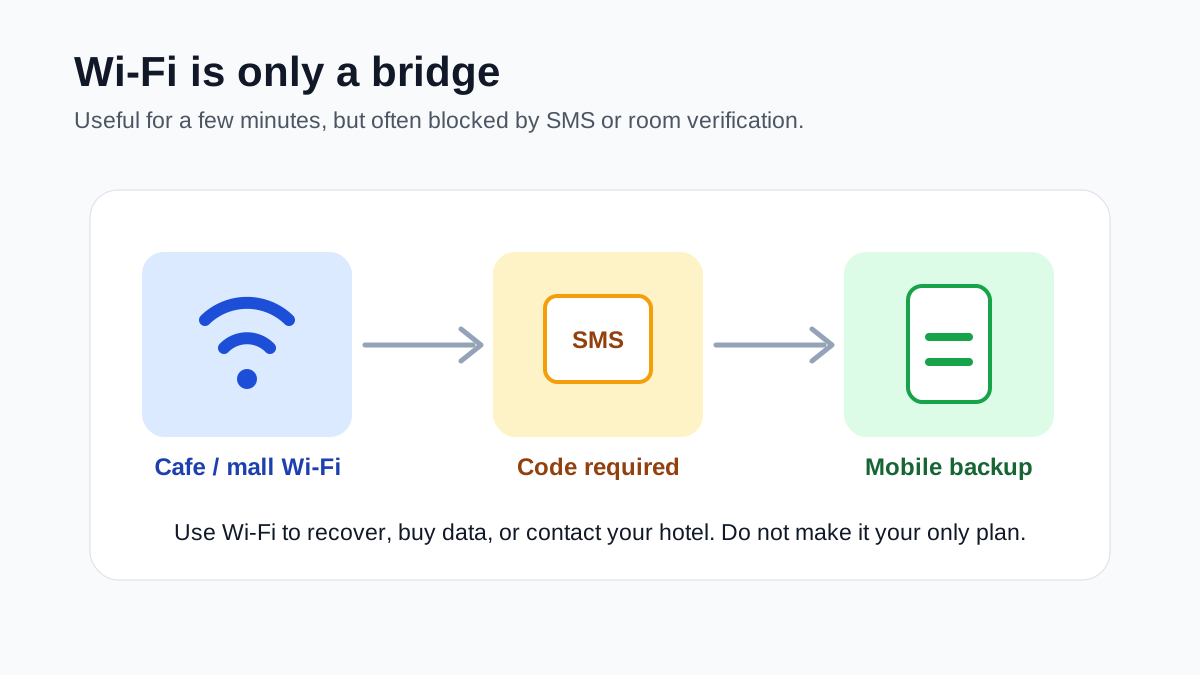
Airport, hotel, mall, cafe, and restaurant Wi-Fi can help in a pinch, but it is not reliable enough as your only plan. Many public Wi-Fi systems ask for an SMS code, and some require a mainland China phone number or hotel-room verification. If you arrive without data, ask the airport information desk or hotel front desk for help getting online long enough to buy data or contact your pickup.
Useful backup, but not enough for first-time visitors who need maps, translation, payments, and taxi pickup.
Troubleshoot no data one variable at a time
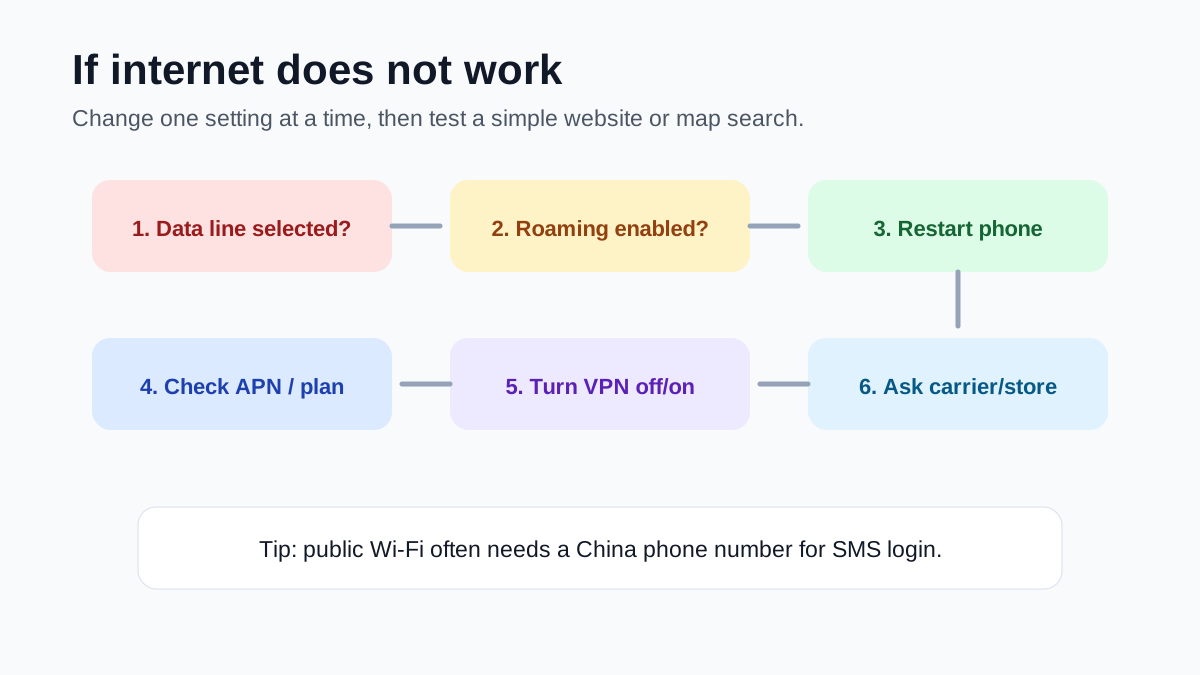
If internet does not work, check the selected data line, data roaming toggle, plan activation, APN/profile, airplane mode restart, VPN on/off state, and whether the local SIM was fully activated. Test with a simple map search or local website after each change. If a local SIM still fails, return to the official carrier counter before leaving the airport or city center.
This prevents the common spiral of toggling everything and losing track of what actually fixed the connection.
Troubleshooting
Common problems and fixes
- eSIM works but no SMS code arrives: most travel eSIMs are data-only and do not give you a mainland Chinese phone number. Use your home SIM for bank SMS or get a local SIM for China SMS.
- Local SIM works but Google or Gmail does not: local mainland networks may not access some overseas services without VPN or international routing.
- VPN does not connect: first test whether normal internet works without VPN, then try another network, server, or protocol. VPN cannot fix a dead data connection.
- Hotel or cafe Wi-Fi asks for a phone number: use local SIM SMS, ask the front desk, or use mobile data instead.
- Bank, card, or email verification is blocked: keep your home SIM active and make sure roaming/short-code SMS is enabled before travel.
- Phone has no eSIM support: use home roaming for arrival, buy a physical local SIM after arrival, or arrange a physical travel SIM before departure.
- The eSIM installed but will not connect: confirm the correct data line, data roaming setting, APN/profile, provider activation time, and whether the plan covers mainland China.
Important warnings
- Do not land with only a plan to buy a SIM later unless you also have airport pickup, offline address screenshots, or roaming backup.
- A local Chinese SIM gives you local convenience but may require VPN for many overseas apps.
- A travel eSIM may give you easy overseas-app access but usually does not give you a China phone number.
- VPN services can be unreliable and should be installed before arrival; do not build a work-critical trip around one untested provider.
- Public Wi-Fi often requires SMS login and should not be your only arrival plan.
- Rules and provider behavior change often. Recheck eSIM coverage, roaming fees, and VPN reliability shortly before travel.
Best route and backup plan
Recommended route
- Short tourist trip: buy and install a travel eSIM before departure, keep home SIM active for SMS, and download VPN only if you will use local Wi-Fi or need a backup.
- Longer stay or local life: use eSIM/roaming for arrival, then get a local SIM with your passport for a Chinese number, and add VPN for overseas services.
- Work trip: prepare two routes, such as international roaming or eSIM plus a tested VPN/company access method, because one network path may fail.
Backup options
- Use airport, hotel, or cafe Wi-Fi only long enough to open maps, contact the hotel, or buy data.
- Keep home roaming active for the first day even if you plan to buy a local SIM.
- Ask the hotel front desk to write your destination in Chinese or help call a ride.
- Visit an official China Mobile, China Unicom, or China Telecom store if local SIM activation or SMS fails.
Other ways to pay
- Home roaming: easiest fallback if your carrier price is acceptable and your phone has no eSIM support.
- Physical travel SIM: useful if bought before departure, but confirm coverage, data routing, and whether it includes a real phone number.
- Portable Wi-Fi: can work for groups, but battery life, pickup/return, and blocked-service behavior still matter.
- Hotel front desk help: useful for writing addresses, calling drivers, or finding carrier stores if your data fails.
FAQ
Do I need an eSIM, local SIM, or VPN for China?
Most short-term tourists should start with a travel eSIM or home roaming for arrival data. Get a local SIM if you need a mainland China phone number. Use VPN only if you need overseas apps on local SIM or local Wi-Fi.
Can an eSIM bypass the Great Firewall in China?
Some internationally routed travel eSIMs and roaming plans may access overseas apps more easily because data exits through Hong Kong or another overseas gateway. This is provider-specific and should not be treated as guaranteed for every China eSIM.
Will a travel eSIM give me a Chinese phone number?
Usually no. Most travel eSIMs are data-only. If you need a mainland Chinese number for SMS verification, delivery, ride-hailing contact, or local services, plan for a local SIM.
Can foreigners buy a local SIM card in China?
Yes. Official Beijing and Shanghai guidance says foreigners can bring a passport or Foreign Permanent Resident ID Card to telecom operator service offices such as China Mobile, China Unicom, or China Telecom to apply for and activate a SIM card.
Should I download VPN before arriving in China?
Yes if you need it. Download, pay for, and test it before arrival because app stores, provider websites, and support pages may be difficult to access from mainland networks.
Can I rely only on hotel Wi-Fi?
No. Hotel Wi-Fi is useful backup, but it may require room verification, may be slow, and may not access overseas apps without VPN. You still need mobile data for taxis, maps, translation, payments, and emergencies outside the hotel.
What if my phone does not support eSIM?
Use home roaming for arrival if affordable, buy a physical local SIM after arrival, or buy a physical travel SIM before departure. Make sure your phone is unlocked.
Why does my internet work but WhatsApp or Google does not?
You may be on a local mainland network where some overseas services are blocked. Use a tested VPN, company access method, or an internationally routed eSIM/roaming connection.
Do I still need my home SIM after buying a local SIM?
Often yes. Your home SIM may be needed for bank, card, email, Apple/Google, and account-security SMS codes. Keep it active if your phone supports dual SIM or eSIM plus physical SIM.
Amap
A Chinese map app for finding stores, planning metro routes, checking addresses, and navigating daily life.
Keep going
Related practical guides

How to Get a SIM Card in China as a Foreigner
Choose between a local SIM, eSIM, and roaming, register with your passport if you need a Chinese number, and test data and SMS before leaving the store.

How to Fix Alipay / WeChat Pay Fails
Troubleshoot Alipay and WeChat Pay failures in China by checking bank blocks, VPN or SMS issues, merchant QR support, amount limits, fees, and backup payment options.

First 72 Hours in China: Practical Setup Checklist
A focused checklist for payments, phone access, transport, hotel basics, food, and emergency backups.