
How to Fix Alipay / WeChat Pay Fails
Payment failure in China is stressful because it usually happens at a taxi, restaurant, vending machine, hotel desk, or checkout counter. The good news is that most failures fall into a few patterns: bank approval, card limits, app verification, merchant QR support, VPN or SMS issues, amount and fee confusion, or foreign-card restrictions.
Difficulty
Medium
Time needed
10-25 minutes
Updated
May 15, 2026
Start here
Quick answer
- If Alipay or WeChat Pay fails, do not keep pressing Pay. Screenshot or read the error, then decide whether it looks like a bank/card issue, merchant QR issue, network/SMS issue, amount/fee issue, or account verification issue.
- The fastest checkout fix is usually: switch to the other app, switch card, try a smaller amount, ask the cashier to scan your payment code instead, or pay cash and debug later.
- Official Chinese guidance confirms foreign visitors can link international cards to Alipay and WeChat Pay, and the overseas visitor mobile-payment cap has been raised to USD 5,000 per transaction and USD 50,000 annually. But your home bank, merchant type, app risk checks, and payment-page terms can still block a transaction.
Requirements
- Required: Alipay or WeChat Pay installed and at least one card already linked.
- Required: working internet connection and access to your home bank app or SMS verification.
- Recommended: two payment apps set up, two cards from different issuers if possible, and RMB 300-500 cash for urgent backup.
- Recommended: passport verification completed in Alipay and WeChat Pay if the app has requested it.
- Optional: a no-foreign-transaction-fee travel card, a physical international card, and an international booking app for trains, hotels, and attractions.
Visual manual
Step-by-step guide
Pause and identify the failure type
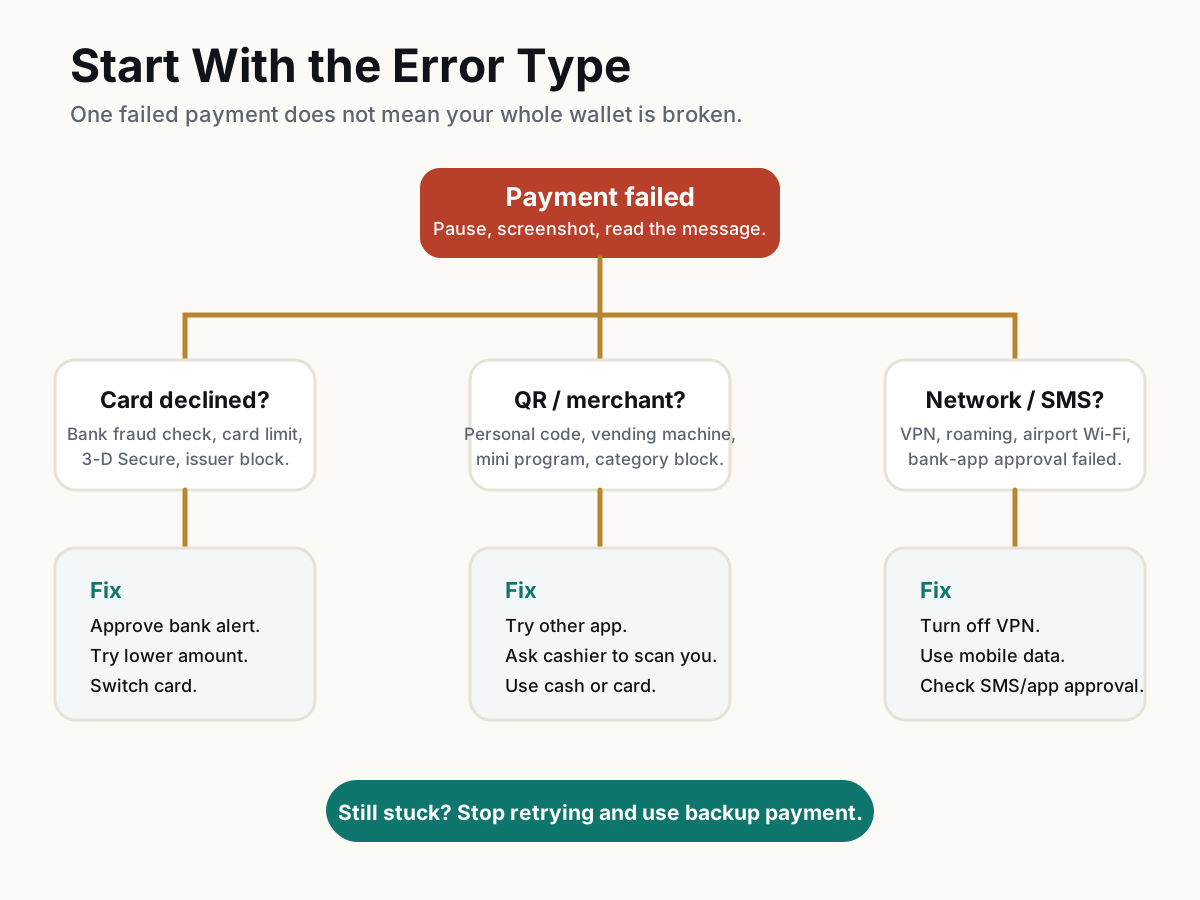
When the payment fails, do not immediately retry five times. Read the message, note whether it happened in Alipay or WeChat Pay, and check whether you were scanning a merchant QR code, showing your payment code, paying inside a mini program, or paying a personal account. These are different payment paths and they can fail for different reasons.
User-reported pattern: generic messages such as Payment failed often hide a bank, merchant, network, or risk-control cause.
Check amount, service fee, and limits
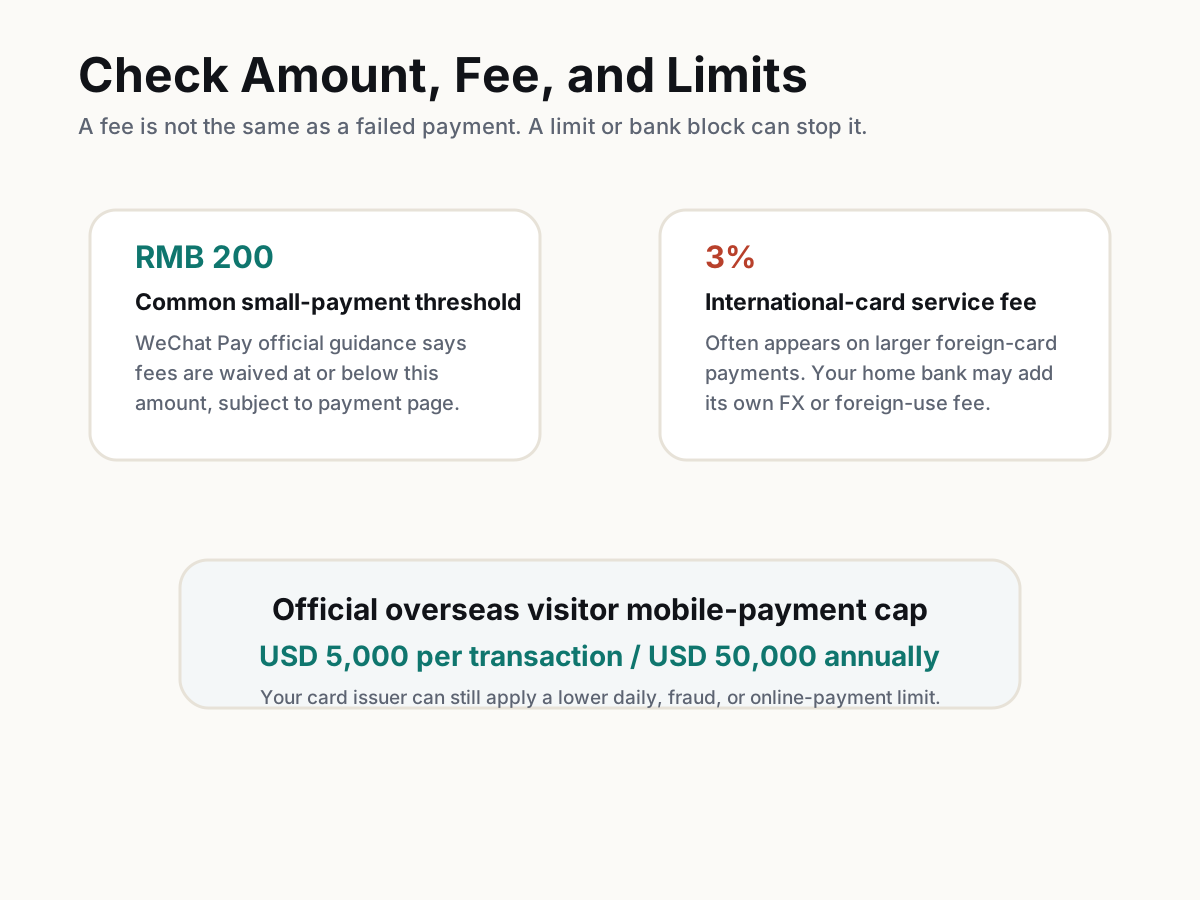
If the payment is above RMB 200, expect possible international-card service-fee behavior in the payment page. WeChat Pay official guidance says transactions at or below RMB 200 are fee-waived, subject to payment-page details, and Beijing's 2026 update describes additional WeChat Pay fee-waiver benefits for first-time linked international-card users. Separately, PBOC and government guidance says overseas visitor mobile-payment limits were raised to USD 5,000 per transaction and USD 50,000 annually. Your bank can still set a lower card limit.
Manual check before publishing: confirm Alipay's current in-app fee wording and current WeChat Pay payment-page terms.
Switch app, card, or QR direction
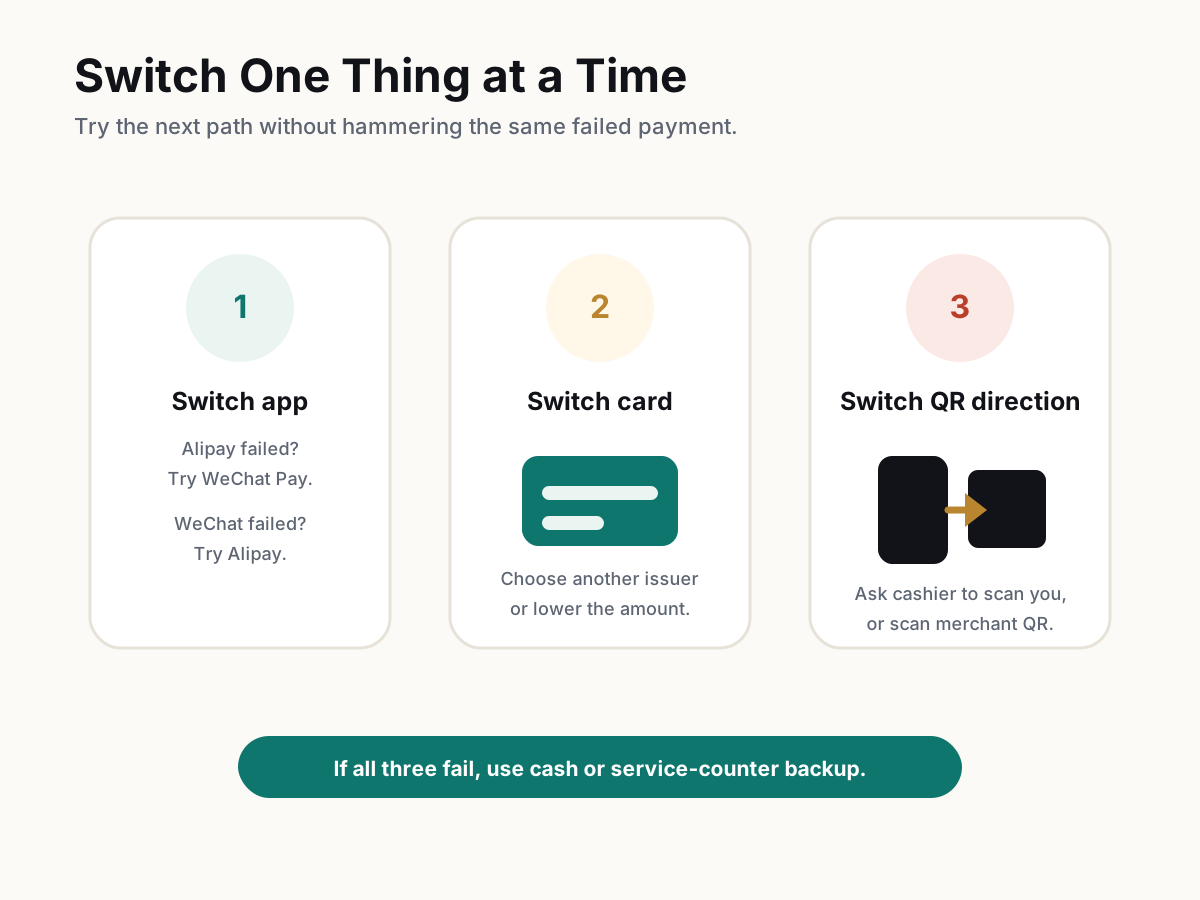
If Alipay fails, try WeChat Pay. If WeChat Pay fails, try Alipay. If one card fails, select another linked card before confirming. If you scanned the merchant's QR code and entered an amount, ask whether the cashier can scan your payment code instead. Do not show your payment code unless you are ready to pay.
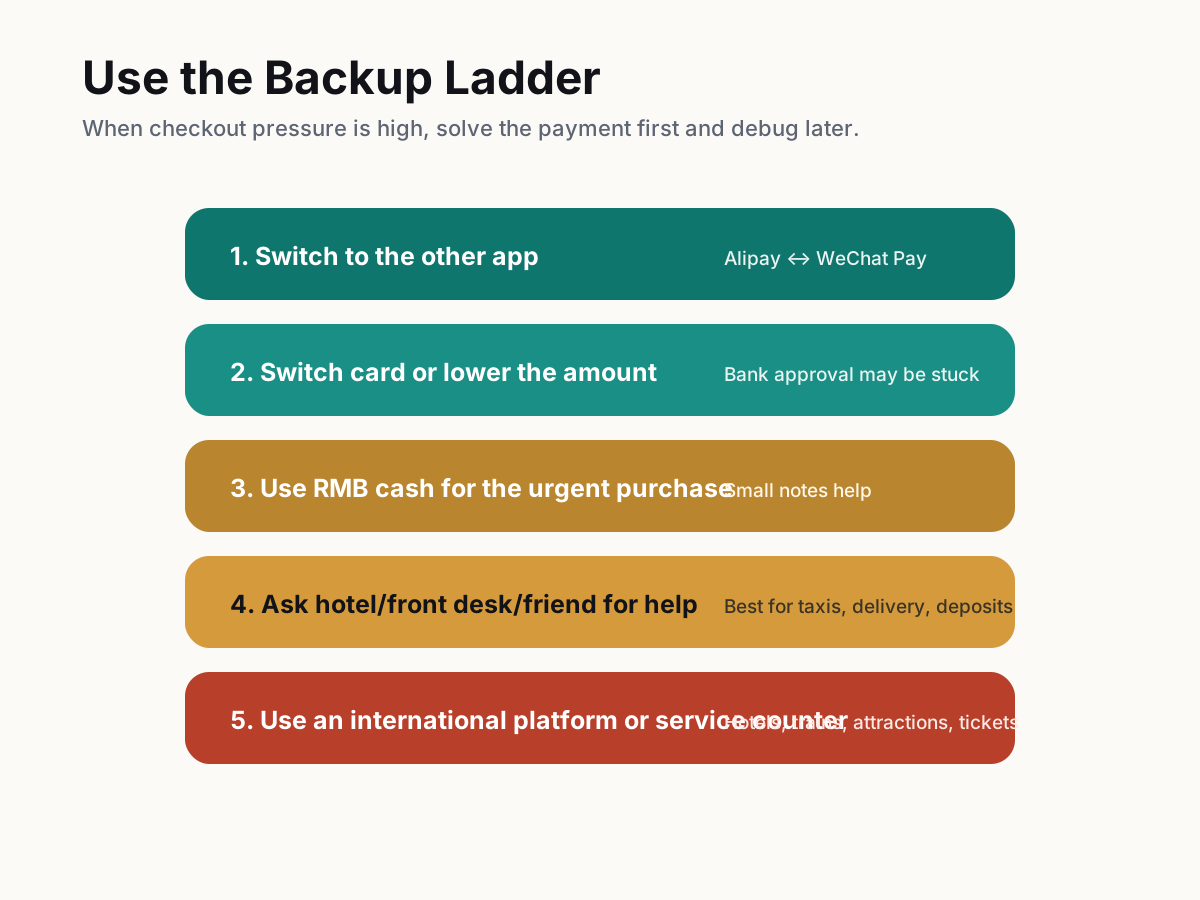
Practical checkout order: other app first, other card second, cash or service counter third.
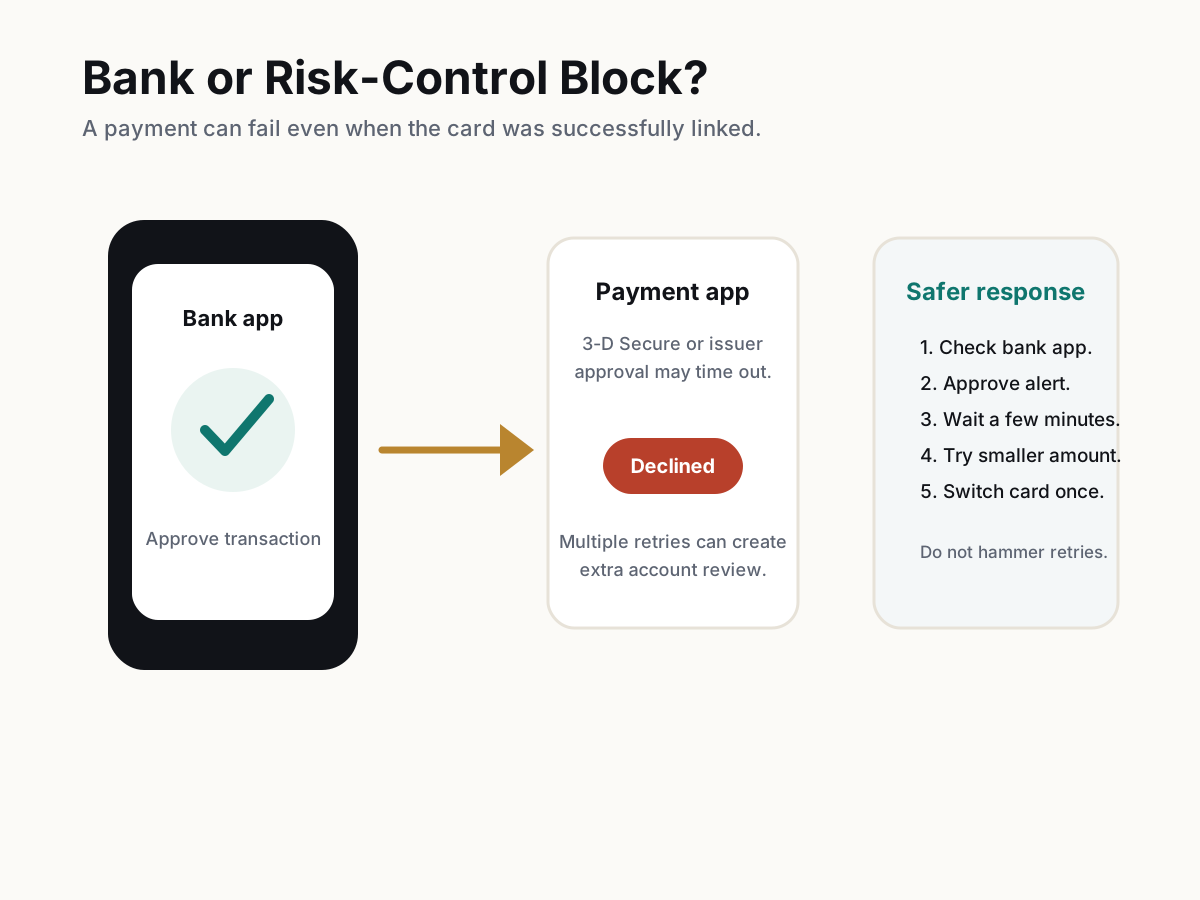
Check your bank app and 3-D Secure approval
A foreign card can link successfully but still fail at live payment. Open your bank app and check for fraud alerts, 3-D Secure prompts, travel controls, online-payment settings, daily card limits, and blocked China transactions. If your bank sends SMS codes, confirm roaming and short-code messages still work.
Reddit users repeatedly report cards linked successfully but live payments declined until bank approval, issuer support, or another card solved it.
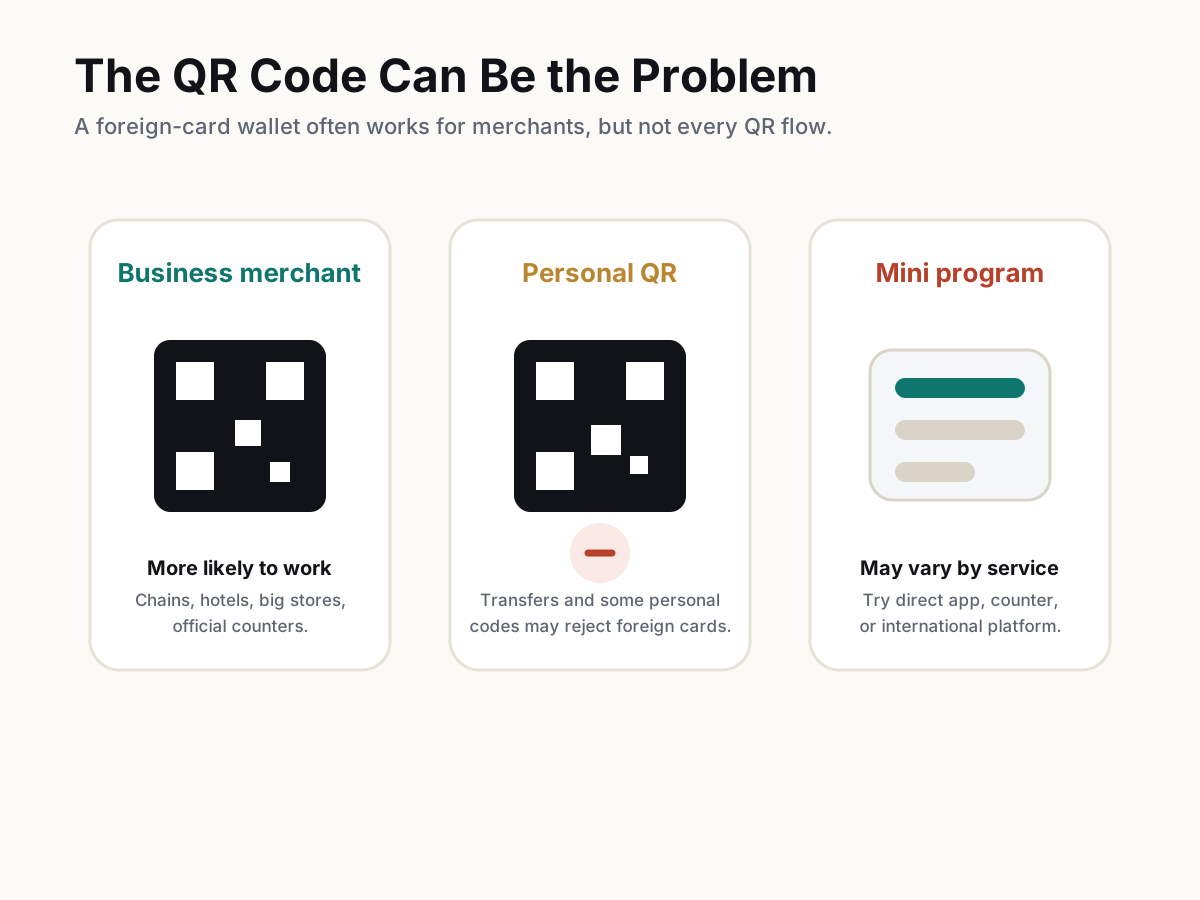
Test whether the merchant QR supports foreign cards
Some failures are not your app or card. Personal QR codes, vending machines, small merchants, mini programs, transfers, red packets, and some online services may reject foreign-card-linked wallets. Larger chains, hotels, official counters, and proper business merchant QR codes are more likely to work.
For WeChat Pay especially, foreign-card accounts are best treated as merchant-payment tools, not full local-wallet replacements.
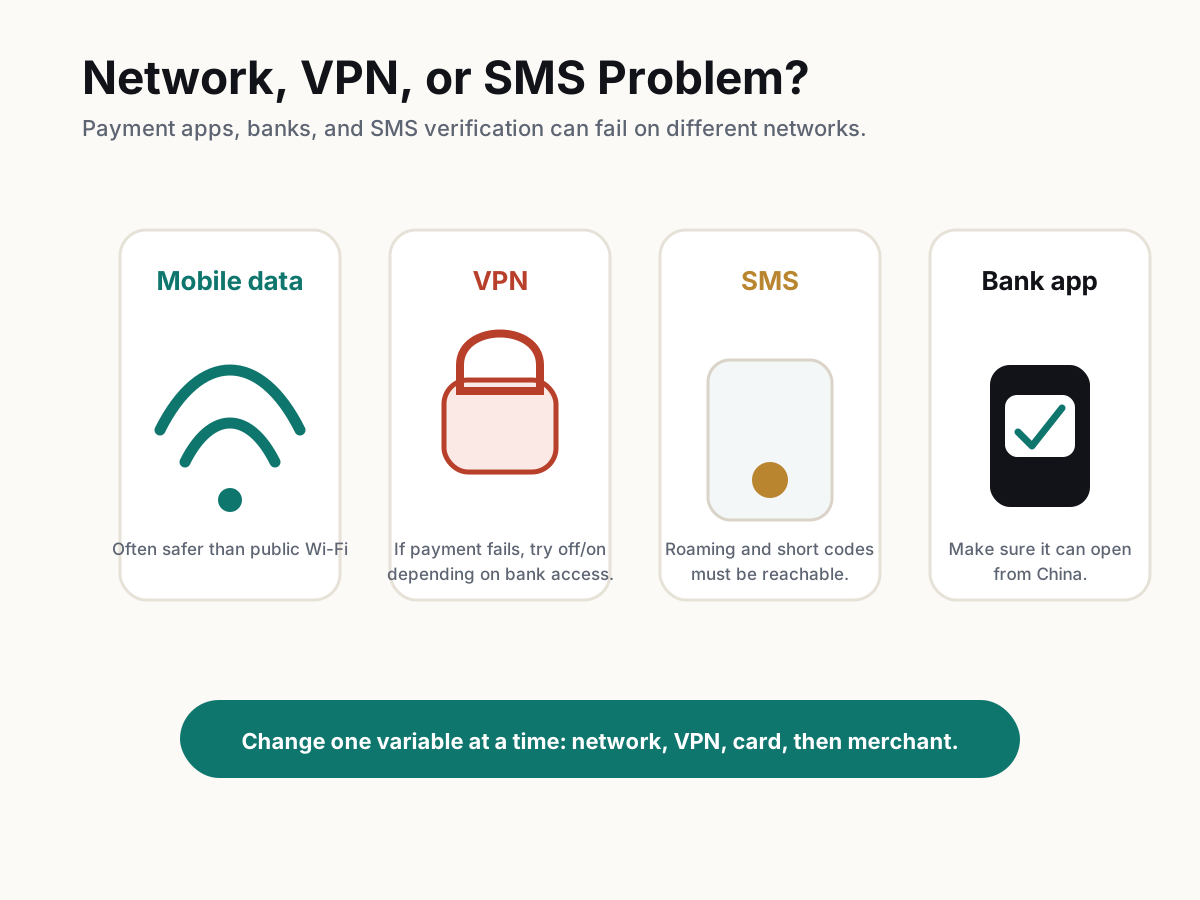
Fix network, VPN, SMS, and bank-app access
If the error mentions network, verification, or security, change one variable at a time. Try mobile data instead of public Wi-Fi. If a VPN is on, test once with it off; if your home bank app needs VPN to open, turn it on only for bank approval and then retry payment. Make sure your original SIM or roaming setup can receive SMS.
Do not rapidly switch every setting and retry repeatedly. Change one thing, then test once.
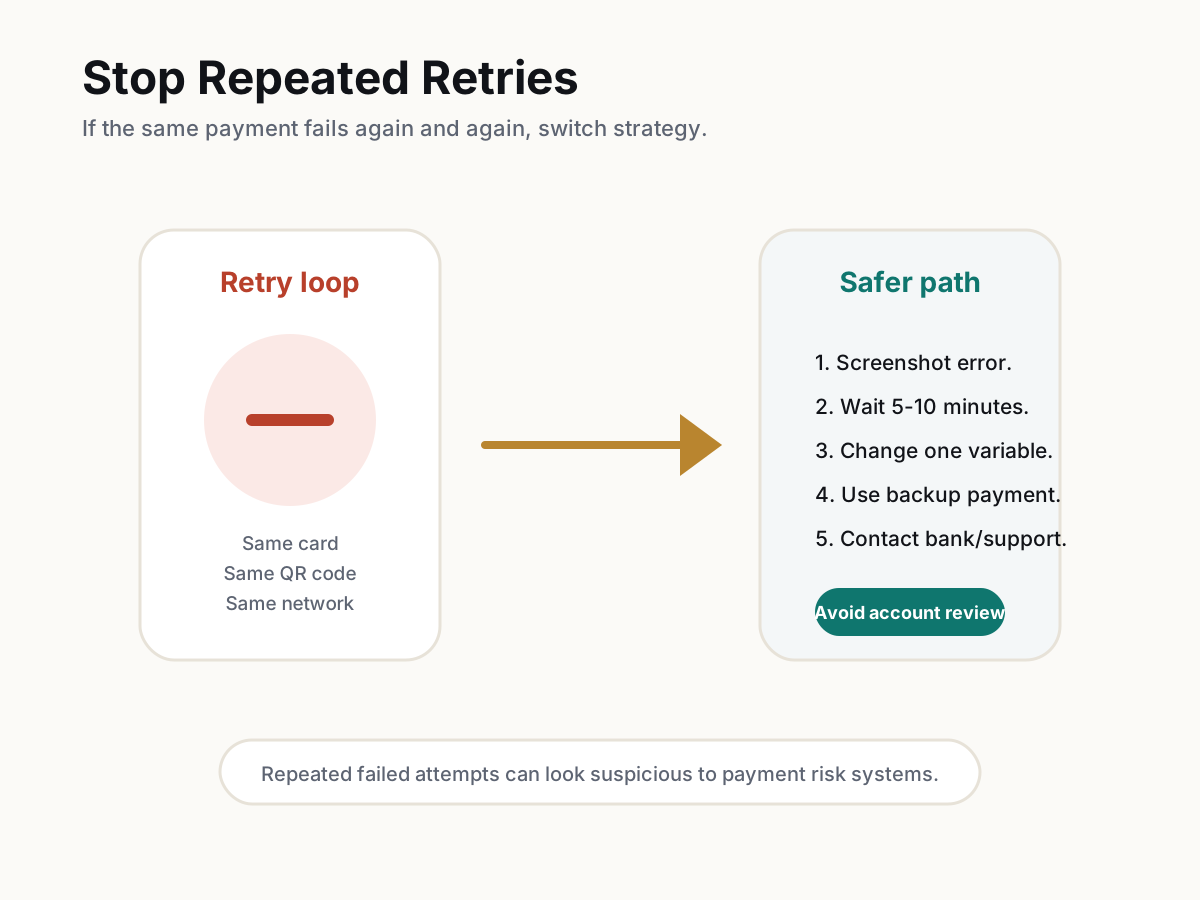
Stop repeated retries before risk control escalates
If the same card fails several times, stop. Repeated failed attempts, failed bank verification, switching multiple cards in a panic, VPN changes, or unusual activity can trigger extra review. If the app asks for proof of card ownership or identity, follow only the official in-app route and avoid third-party helpers.
If a card enters risk review, remove it only after you understand the app's instructions and keep screenshots of support messages.
Use the backup ladder and solve the urgent moment first
At a restaurant, taxi, hotel, or station, your first goal is to finish the immediate payment. Use the other app, another card, cash, a service counter, hotel/front-desk help, or an international platform. After you are out of the checkout situation, call the bank, check app support, and test with a small merchant payment.
China is very mobile-payment heavy, but official guidance still keeps bank cards and cash as part of the visitor-payment system.
Troubleshooting
Common problems and fixes
- Alipay says Payment failed: check bank approval, amount, merchant QR type, network/VPN, and whether the account has a security prompt.
- WeChat Pay says the current document type or overseas merchant is unsupported: the merchant, mini program, or region may not support foreign-card WeChat Pay. Try Alipay, cash, or a direct card/counter payment.
- The card was added successfully but cannot pay: card linking and live payment are different checks. Your issuer may still decline the transaction.
- A vending machine, personal QR, or small merchant fails: try a staffed counter, chain store, business QR, or the other app.
- The payment asks for SMS or bank approval but no code arrives: check roaming, short-code blocking, eSIM-only data, bank-app access, and public Wi-Fi restrictions.
- The payment amount is high: try a smaller amount, direct card payment at a hotel/tourist site, or an international booking platform.
- The 3% fee appears: this is usually a service-fee/foreign-card issue, not necessarily a failed-payment issue. Also check your home bank's foreign-transaction fee.
- The app asks for card ownership or passport proof: use only the official in-app review route and stop repeated attempts until review is resolved.
Important warnings
- Do not keep retrying the same failed payment many times. User reports indicate repeated failures can trigger risk review or requests for card ownership proof.
- Do not rely on one app, one card, or one network. Have Alipay, WeChat Pay, at least one backup card, and some RMB cash.
- Foreign-card wallets may pay merchants but fail for transfers, red packets, personal QR codes, balance top-ups, or some mini programs.
- Fee and waiver rules can change. The payment page inside Alipay or WeChat Pay controls the actual charge.
- Never send passport photos, card photos, or payment-code screenshots to unofficial helpers.
Best route and backup plan
Recommended route
- Before travel: set up both Alipay and WeChat Pay, link two cards if possible, enable bank travel/security settings, keep SMS access, and carry RMB cash.
- At checkout: switch app, switch card, try the other QR direction, then use cash or counter help if the line is waiting.
- Afterward: check bank alerts, contact app support if needed, and test again with a small normal merchant payment.
Backup options
- Use the other wallet app if one app fails.
- Use another linked card, preferably from a different issuer or card network.
- Pay cash for the urgent item and troubleshoot later.
- Use a physical international card at hotels, tourist sites, and larger stores where the right card-network logo is displayed.
- Use Trip.com, Klook, a ticket counter, hotel desk, or service counter for time-sensitive bookings.
Other ways to pay
- Cash: best emergency backup for taxis, small vendors, and quick checkout problems.
- Physical international card: useful at major hotels, tourist attractions, airports, and larger stores with card-network terminals.
- International platforms: useful for hotels, trains, attractions, and tours when local mini-program payments fail.
- Service counter or hotel/front desk: useful when a machine, app, or mini program will not accept foreign-card payment.
FAQ
Why does Alipay or WeChat Pay fail even after I linked my card?
Card linking only proves the app accepted the card details. A live payment can still be blocked by your bank, 3-D Secure, card limits, merchant category, app risk control, network checks, or a QR code that does not support foreign-card accounts.
Should I turn off my VPN when payment fails?
Try changing one network variable at a time. For the payment app, mobile data without VPN may be more stable. For your home bank app, VPN may be needed to approve a transaction. Avoid switching rapidly and retrying many times.
Is the RMB 200 rule a spending limit?
No. RMB 200 is commonly discussed as a fee threshold for international-card payments, especially in WeChat Pay official guidance. Official visitor mobile-payment limits are much higher, but your card issuer and payment-page terms still matter.
What is the official mobile payment limit for overseas visitors?
PBOC and Chinese government guidance says the single transaction limit for overseas visitors using mobile payments was raised to USD 5,000, and the annual cumulative cap to USD 50,000. Your bank may set a lower limit.
Why does payment work at one shop but fail at another?
The merchant setup may differ. A proper business merchant QR at a chain store may support foreign-card payments, while a personal QR code, vending machine, mini program, or certain merchant category may fail.
Can I transfer money or send red packets with a foreign card?
Do not rely on it. Foreign-card wallets are mainly useful for merchant payments. Transfers, red packets, personal QR payments, and balance features may require a fuller local wallet or Chinese bank-card setup.
What should I do if both Alipay and WeChat Pay fail at a restaurant?
First solve the immediate payment: try another card, ask whether the cashier can scan your payment code, use cash, ask a friend/hotel/front desk for help, or use a physical card if accepted. Then debug the app later.
How much cash should I carry as backup?
For this troubleshooting guide, RMB 300-500 is a practical emergency layer for many short-term visitors. A separate cash guide should cover trip length, exchange, ATMs, and where cash is still useful.
Should I contact Alipay, WeChat Pay, or my bank first?
If the bank app shows a fraud alert, contact or approve through the bank first. If the app asks for identity/card proof, use the official in-app support path. If the problem happens only with one merchant, try another merchant before opening a support case.
Alipay
China's essential payment and daily services app.
Keep going
Related practical guides

How to Set Up Alipay as a Foreigner in China
Set up Alipay with a foreign phone number, passport, and international bank card so you can pay by QR code in China.

How to Use WeChat Pay with a Foreign Bank Card
Set up WeChat Pay with a passport and foreign bank card, then use QR payments in shops, taxis, restaurants, and mini programs.

First 72 Hours in China: Practical Setup Checklist
A focused checklist for payments, phone access, transport, hotel basics, food, and emergency backups.