
How to Choose China eSIM / VPN / SIM
eSIM, VPN, and local SIM are often discussed as if they are interchangeable. They are not. A travel eSIM usually solves arrival data, a local SIM solves the mainland Chinese phone-number problem, and a VPN helps with overseas apps only after you already have a working internet connection.
Difficulty
Easy
Time needed
10-20 minutes
Updated
May 15, 2026
Start here
Quick answer
- Short tourist trip: use a travel eSIM or home roaming for arrival data, keep your home SIM active for bank SMS, and save hotel/map screenshots. This is usually enough if you do not need a mainland Chinese number.
- Longer stay or local-life trip: use eSIM/roaming for arrival, then get a mainland local SIM with your passport for delivery, Wi-Fi SMS, app verification, school, work, and local customer service.
- Work or overseas-app heavy trip: prepare VPN or company remote access before arrival, and keep at least two internet routes. VPN is not internet; it needs eSIM, roaming, local SIM data, hotel Wi-Fi, or office Wi-Fi underneath.
Requirements
- Required: know whether your phone supports eSIM and whether it is carrier-unlocked.
- Required: decide whether you need a mainland Chinese phone number, not just internet data.
- Required: list the overseas apps you must use, such as Google, Gmail, WhatsApp, Instagram, YouTube, Slack, or company tools.
- Recommended: keep your home SIM active for bank and account-security SMS.
- Recommended: download and test VPN or company access before arrival if you need it.
- Recommended: check data allowance and hotspot rules before buying eSIM, roaming, or pocket Wi-Fi.
Visual manual
Step-by-step guide
Use the choice matrix first
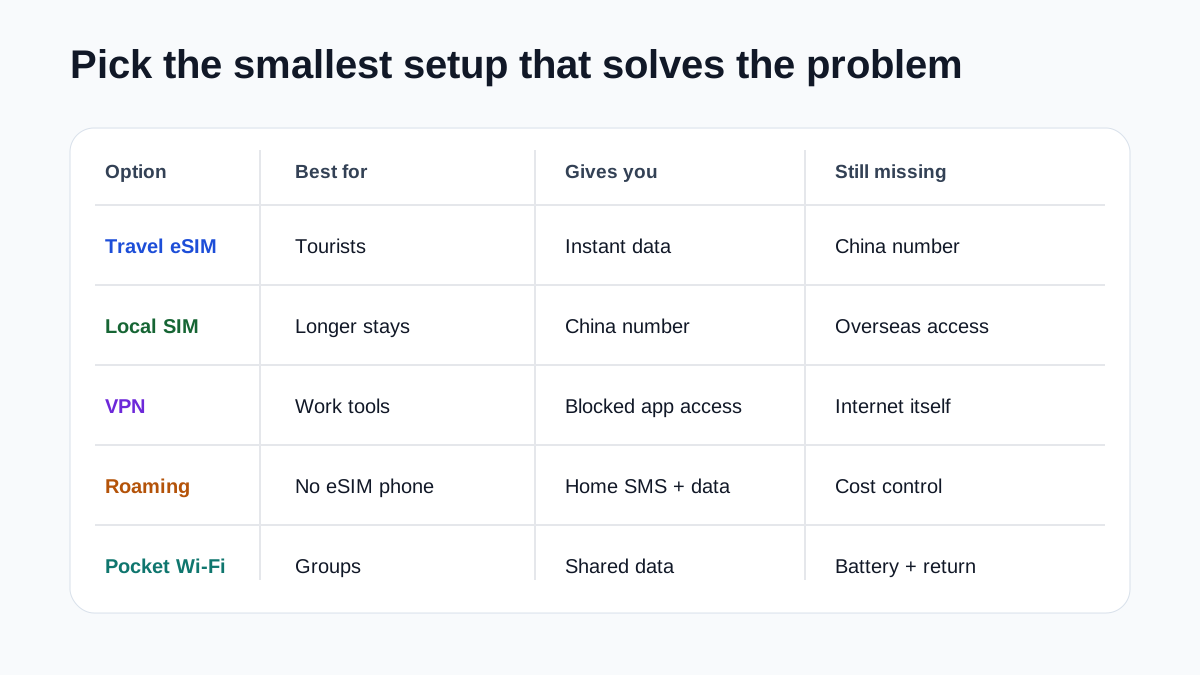
Do not start by asking which brand is best. Start by matching the product to your need. Travel eSIM is usually best for instant data. Local SIM is best for a mainland Chinese number. VPN is best for overseas app access on local networks. Roaming is a good fallback when your phone has no eSIM. Pocket Wi-Fi can help groups but adds battery and pickup/return friction.
This matrix prevents the common mistake of buying eSIM for SMS or buying VPN before having a data route.
Choose eSIM-only for a simple tourist trip
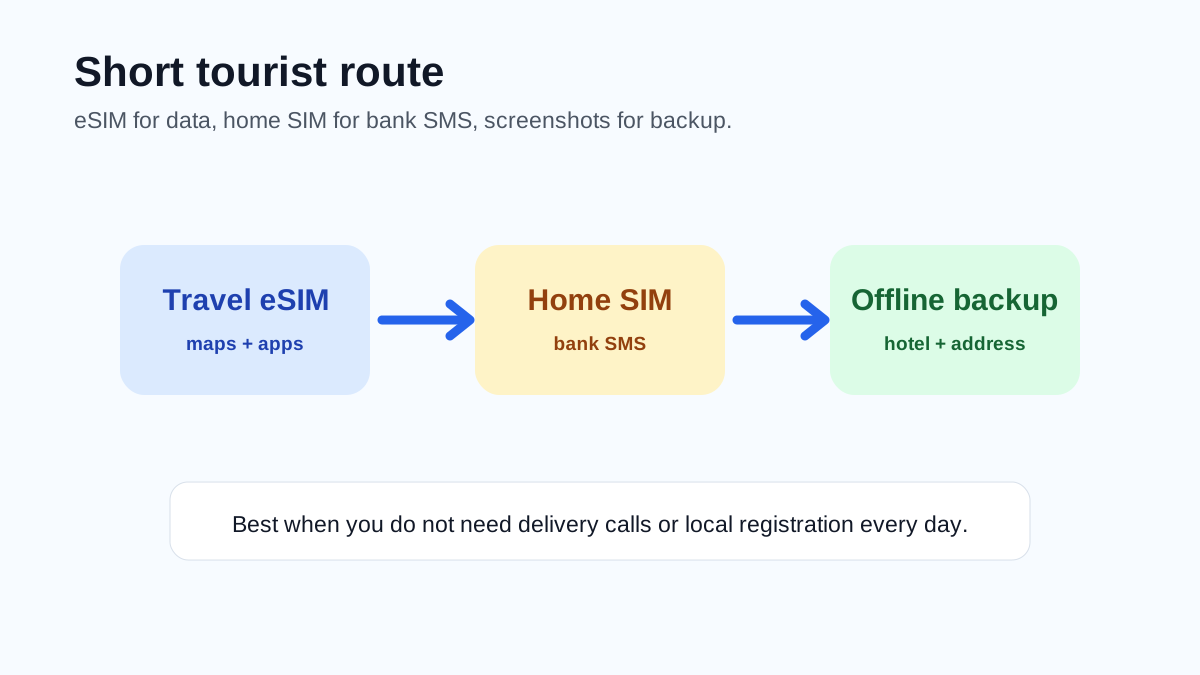
If you are visiting for a few days or a short holiday, do not need a China phone number, and mostly need maps, translation, messaging, Alipay/WeChat troubleshooting, and overseas apps, a travel eSIM or roaming plan is usually the cleanest route. Keep your home SIM active for bank SMS and carry offline address screenshots in case activation fails.
User reports in 2026 often say internationally routed eSIM data works well for Google/WhatsApp, but provider routing can change.
Choose local SIM plus VPN for longer stays
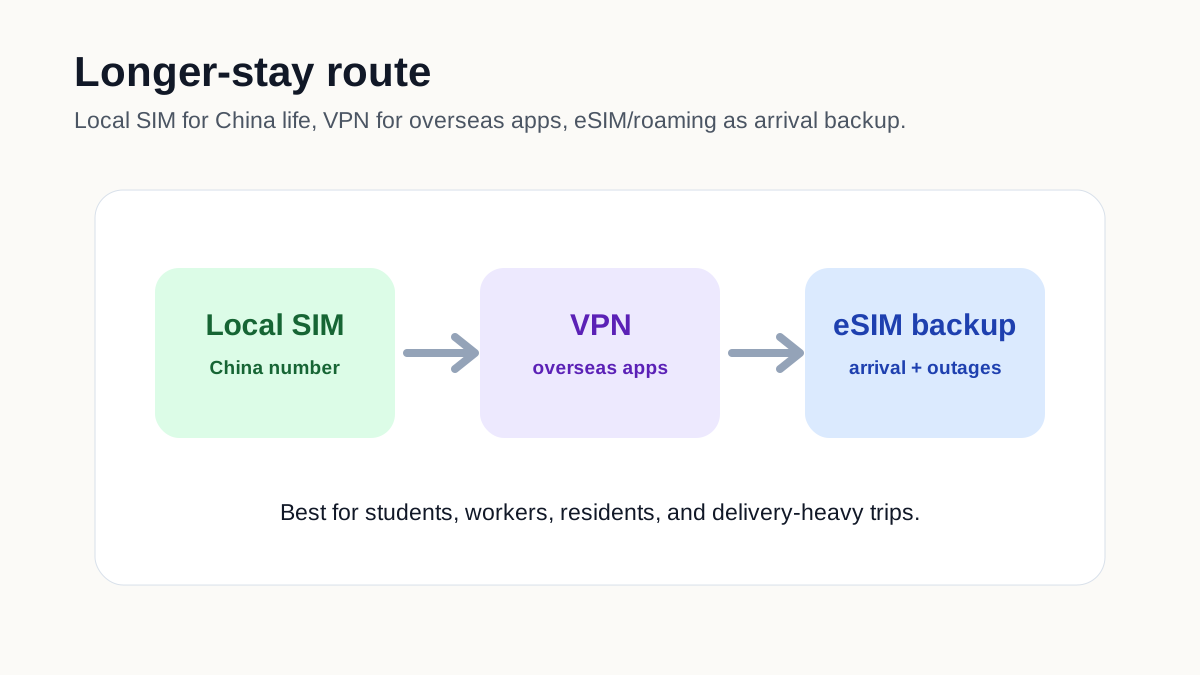
If you will live, study, work, receive deliveries, use local services, or need a local contact number, plan to get a mainland SIM after arrival. Bring your passport and use an official carrier store or airport service counter. If you also need overseas apps, prepare VPN before arrival because a local SIM may place you on normal mainland internet.
Official city guidance confirms foreigners can apply for SIM cards with passport or Foreign Permanent Resident ID Card.
Plan work access separately
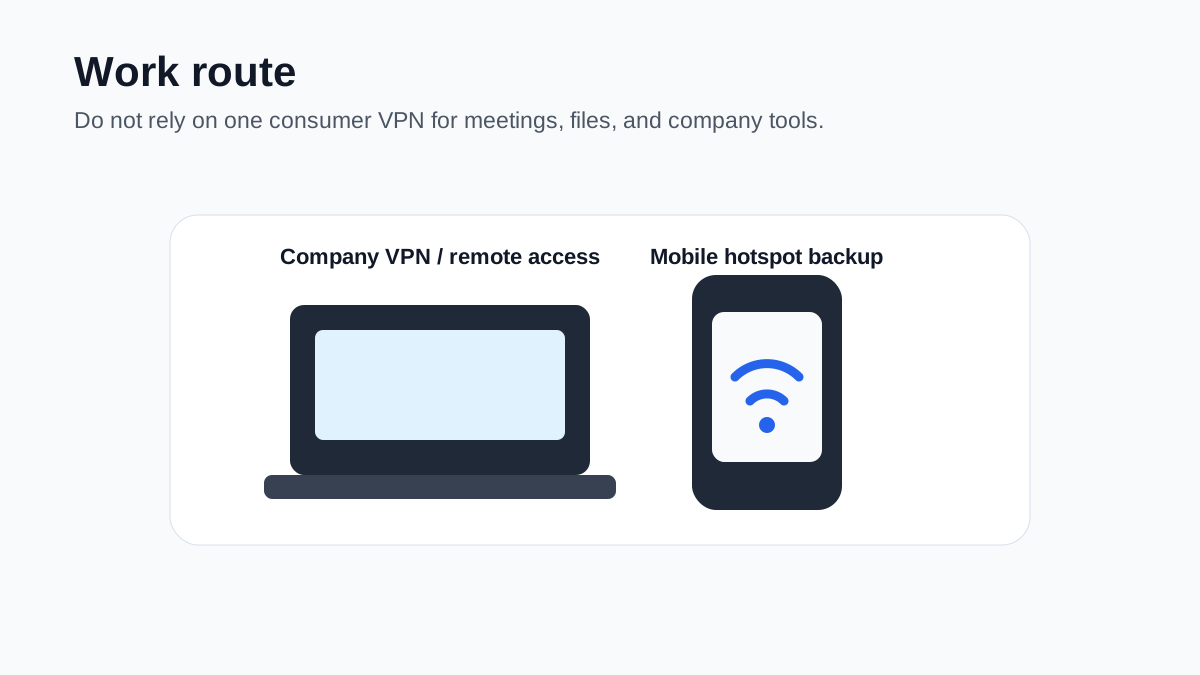
For remote work, client calls, file sync, Google Workspace, Microsoft services, Slack, GitHub, banking portals, or company VPN, do not rely on one consumer connectivity product. Prepare company-approved access, an eSIM or roaming route, and a local backup. Test hotspot rules because some eSIM plans restrict or slow tethering.
Manual verification: company security policies may prohibit some VPN/proxy routes or unmanaged hotspots.
Buy enough data if you will avoid public Wi-Fi
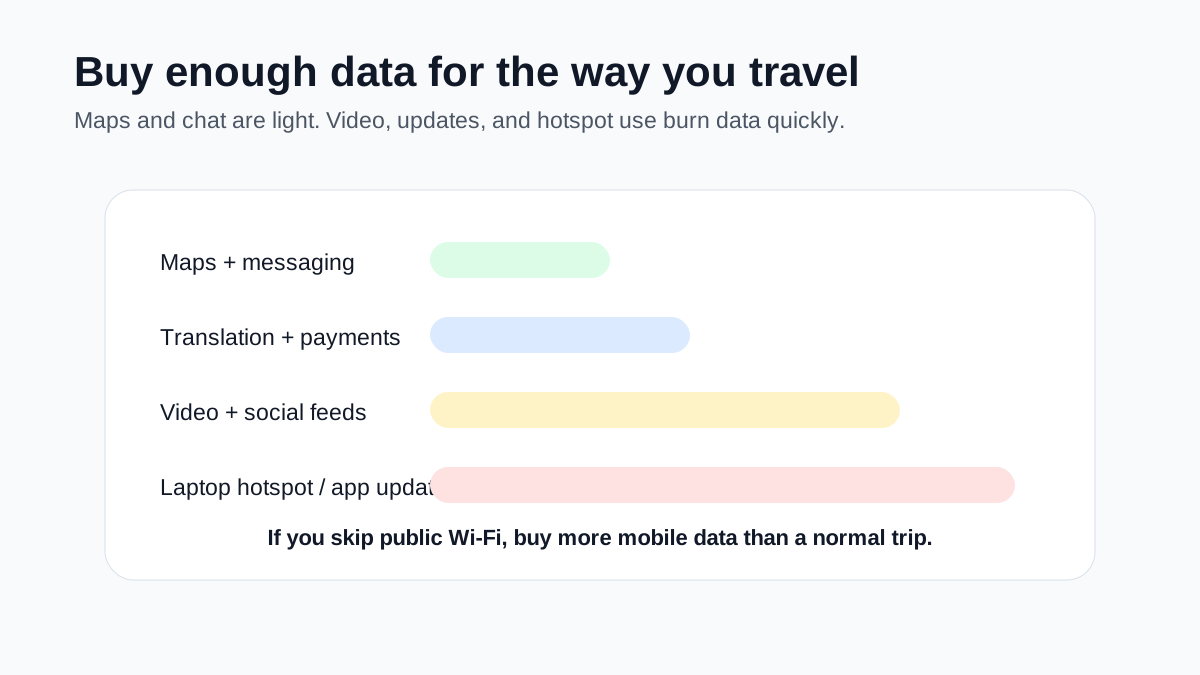
Many travelers use eSIM data more than expected because public Wi-Fi can require China SMS, be slow, or need VPN for overseas apps. Maps, chat, and translation are light. Video, social feeds, cloud sync, app updates, and laptop hotspot use can drain data fast. If you plan to stay mostly on mobile data, buy more than a minimal plan.
User-reported pain point: people burn through data when they avoid public Wi-Fi.
Avoid the common traps
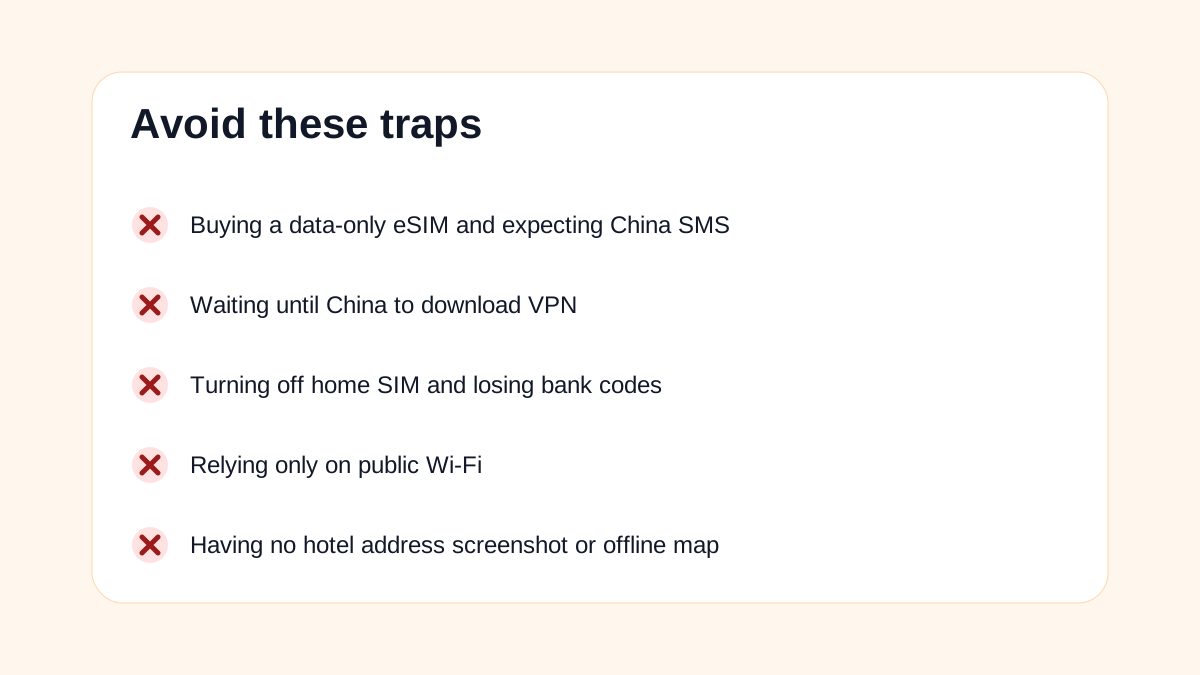
The biggest mistakes are predictable: buying a data-only eSIM and expecting China SMS, waiting until China to download VPN, turning off the home SIM and losing bank codes, relying only on public Wi-Fi, and having no offline hotel address or map screenshot. Build one main route and one backup route before you fly.
This is the checklist to review the night before departure.
Troubleshooting
Common problems and fixes
- I need Google and WhatsApp for a short trip: choose internationally routed eSIM or home roaming first; VPN may be optional on mobile data but useful for local Wi-Fi backup.
- I need Meituan, delivery calls, and Wi-Fi SMS: choose local SIM, because eSIM data usually does not give a mainland Chinese number.
- I have no eSIM phone: use home roaming for arrival or buy a physical travel SIM before departure, then local SIM after arrival if needed.
- I need laptop work: prepare company VPN/remote access, eSIM or roaming, and a backup route; check hotspot terms.
- I want the cheapest option: local SIM can be cheaper for long stays, but registration time, passport setup, VPN needs, and arrival internet matter.
- I want to avoid VPN completely: stay on a reliable internationally routed eSIM/roaming plan as much as possible, but keep expectations flexible because routing and app access vary.
Important warnings
- Do not treat eSIM, VPN, and local SIM as substitutes. They solve different layers of the problem.
- Do not buy a data-only eSIM if your real need is a mainland Chinese phone number.
- Do not wait until you are in mainland China to download VPN or configure company access.
- Do not rely only on public Wi-Fi; SMS login and overseas app access can block you.
- Do not choose solely by advertised price. Check data amount, validity, hotspot support, routing, refund policy, and activation timing.
- Provider performance changes. Recheck eSIM routing and VPN reliability shortly before travel.
Best route and backup plan
Recommended route
- Most tourists: travel eSIM before arrival plus home SIM SMS and offline screenshots.
- Longer-stay visitors: eSIM/roaming for arrival, then local SIM for Chinese number, plus VPN for overseas services.
- Work travelers: eSIM or roaming plus tested VPN/company access and a second backup route.
Backup options
- Use home roaming for arrival if eSIM fails or your phone is not eSIM-capable.
- Use an eSIM for arrival and buy local SIM later.
- Use local SIM plus VPN if you need China number and overseas access.
- Use pocket Wi-Fi for groups only if pickup, return, battery, and overseas access are acceptable.
Other ways to pay
- Home roaming: easiest no-setup fallback, but check cost and speed limits.
- Pocket Wi-Fi: good for groups if battery, pickup/return, and blocked-service behavior are acceptable.
- Physical travel SIM: useful for non-eSIM phones, but check whether it includes a number or only data.
- Hotel Wi-Fi: useful temporary backup, not a complete travel internet strategy.
FAQ
Is eSIM better than VPN for China?
They are different. eSIM gives you mobile data. VPN helps access some overseas services after you already have internet. For short tourists, an internationally routed eSIM may reduce the need for VPN on mobile data.
Do I need both eSIM and VPN?
Maybe. If you stay on an internationally routed eSIM and only use your phone, you may not need VPN often. If you use local SIM, hotel Wi-Fi, office Wi-Fi, or laptop work tools, VPN or company access is more likely to matter.
Do I need a local SIM if I have eSIM?
Only if you need a mainland Chinese phone number for SMS verification, delivery calls, local apps, school/work contact, Wi-Fi login, or a longer stay.
Can I use WhatsApp, Google, Gmail, and Instagram with eSIM in China?
Many users report that internationally routed travel eSIMs work for these apps without VPN, but it depends on the provider and routing. Do not assume every China eSIM behaves the same.
Is local SIM cheaper than eSIM?
Often for longer stays, yes. But local SIM setup takes time, requires passport registration, may not help with overseas apps without VPN, and does not solve arrival internet unless you can buy it immediately.
What should I choose if my phone does not support eSIM?
Use home roaming for arrival if affordable, buy a physical travel SIM before departure, or get a local physical SIM after arrival. Prepare VPN before arrival if you need overseas apps on local networks.
Is pocket Wi-Fi a good option?
It can be good for families or groups, but it adds battery, pickup/return, device-sharing, and blocked-service questions. It also may not give you a China phone number.
Should I buy unlimited data?
Only if the fair-use policy, speed limits, hotspot rules, and validity make sense. Some unlimited plans slow after a threshold, so read the plan terms.
Amap
A Chinese map app for finding stores, planning metro routes, checking addresses, and navigating daily life.
Keep going
Related practical guides

How to Get Internet in China
Choose the right China internet setup for your trip: travel eSIM, roaming, local SIM, VPN, hotel Wi-Fi, and backup access before arrival.

How to Get a SIM Card in China as a Foreigner
Choose between a local SIM, eSIM, and roaming, register with your passport if you need a Chinese number, and test data and SMS before leaving the store.

First 72 Hours in China: Practical Setup Checklist
A focused checklist for payments, phone access, transport, hotel basics, food, and emergency backups.