
How to Register WeChat as a Foreigner
WeChat is the app foreigners usually need for contacts, groups, hotels, schools, work, mini programs, and WeChat Pay. Registration can be easy, but some new foreign accounts get stuck at SMS or friend verification, so the safest approach is to set it up early and keep the account stable.
Difficulty
Medium
Time needed
15-30 minutes
Updated
May 14, 2026

Start here
Quick answer
- Install the official WeChat app, tap Sign Up, register with a phone number you can still access, and complete SMS verification.
- If WeChat asks for friend verification, you may need a trusted existing WeChat user to help verify your registration.
- After registration, avoid rapid friend-adding, repeated login attempts, suspicious links, and sudden device or network changes while the account is new.
Requirements
- Official WeChat app.
- Phone number that can receive SMS or calls.
- Stable internet connection.
- Trusted existing WeChat user, only if friend verification appears.
- Passport and bank card later if you plan to set up WeChat Pay.
Visual manual
Step-by-step guide
Install the official WeChat app
Search for WeChat in the App Store or your normal Android app store and check that it is the official Tencent/WeChat app. Avoid cloned APKs or random download links because unofficial installs can create security and account-risk problems.
The Apple App Store listing confirms WeChat supports chats, calls, mini programs, Weixin Pay where available, and 20+ languages.

Start registration with your phone number
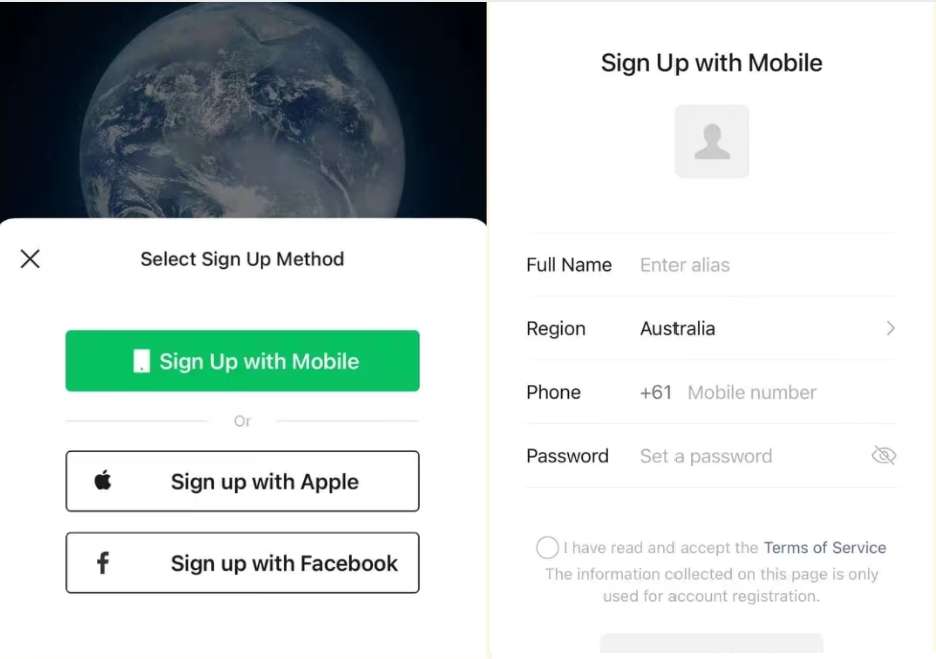
Open WeChat and tap Sign Up. Choose the country or region code that matches your phone number, then enter a number you can access during the trip. Do not use a temporary number unless you are comfortable losing account recovery access later.
If you will later buy a Chinese SIM, keep access to the original registration number until the WeChat account is stable.
Set password, profile name, and basic details
Create a password and profile name that look normal and recognizable. Use a real name, nickname, or travel identity your contacts can recognize, especially if hotels, schools, employers, or guides will add you.
One phone number is generally tied to one WeChat account. Reusing numbers or changing details too quickly can create account recovery trouble.
Complete SMS or security verification
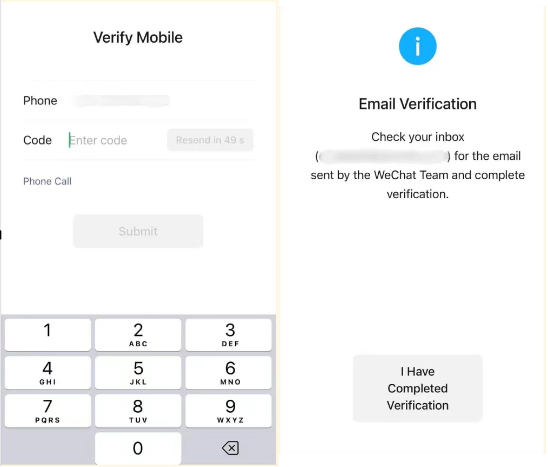
Enter the SMS or call verification code when it arrives. If the code does not arrive, wait and check roaming, mobile data, blocked short codes, and your selected country code before retrying repeatedly.
Repeated rapid attempts can make registration harder. Switch to a stable connection and try again calmly.
Handle friend verification if it appears
Some new accounts are asked for friend verification. This usually means an existing WeChat user must help verify your registration. Ask someone you already know, such as a colleague, classmate, host, guide, hotel contact, or Chinese-speaking friend.
Do not post your QR code or personal phone number publicly. Avoid paying random strangers to verify you.

Stabilize the account before heavy use
Once registration works, use WeChat normally for a few days: message real contacts, join only necessary groups, and avoid mass adding strangers. Keep your phone number reachable and avoid switching devices, VPNs, or login locations repeatedly.
New accounts are more sensitive to unusual behavior. Slow, ordinary use is safer than trying to set up everything at once.
Set language and translation tools
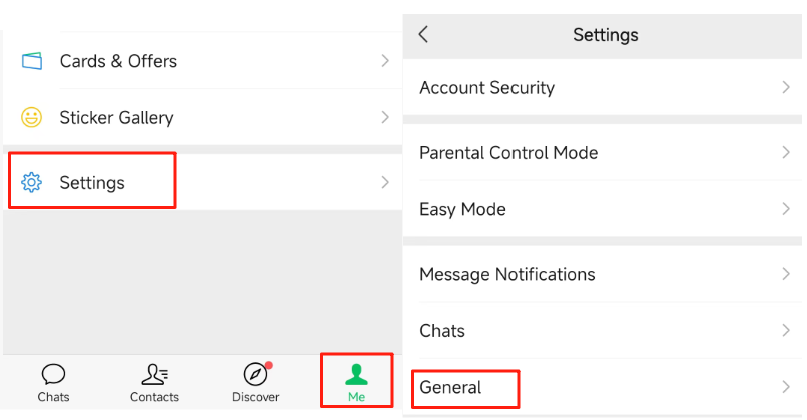
After registration, open Me > Settings > General > Language to choose English or another language if needed. WeChat also has translation features for messages and some pages, which helps when contacts or mini programs use Chinese.
Even with English selected, many mini programs and service pages inside WeChat remain Chinese-first.
Continue to WeChat Pay only after the account works
Basic WeChat registration is separate from WeChat Pay. Once your account can message normally, you can set up WeChat Pay with passport and foreign bank card details if you need payments in China.
If you need payment immediately, set up Alipay too. It is often the easier first payment app for visitors.
Troubleshooting
Common problems and fixes
- SMS code does not arrive: check country code, roaming, mobile signal, blocked short codes, and whether the number has already been used.
- Friend verification blocks registration: ask a real trusted WeChat user; do not rely on public strangers or paid verification offers.
- Helper cannot verify you: the helper's account may not meet WeChat's current security requirements or may have helped too many accounts recently.
- Account gets restricted soon after signup: repeated login attempts, device switching, VPN/proxy changes, mass-adding contacts, or suspicious links may trigger checks.
- You cannot use WeChat Pay yet: payment setup is separate and may require passport and card verification.
Important warnings
- Do not publish friend-verification QR codes or phone numbers publicly.
- Avoid unofficial APKs, cloned apps, rented phone numbers, and paid stranger verification offers.
- Keep access to the phone number used for registration; it may be needed for future login, recovery, and security checks.
- WeChat and WeChat Pay are connected but separate: registering WeChat does not automatically activate payment.
Best route and backup plan
Recommended route
- Register before arrival if possible, while you still have time to solve SMS or friend verification.
- Use a long-term phone number you can keep accessing.
- After signup, add key contacts slowly and wait until the account is stable before setting up WeChat Pay.
Backup options
- Ask a school, employer, hotel, guide, host, or local contact for legitimate verification help.
- Try again later on stable mobile data or trusted Wi-Fi instead of repeated rapid attempts.
- Use Alipay, email, phone calls, WhatsApp/Signal/Telegram where available, or SMS as temporary contact routes.
- If you are travelling soon, ask your hotel or tour provider for a non-WeChat contact method before arrival.
Other ways to pay
- Alipay for payments and many city services.
- Phone, email, or hotel front desk contact for urgent travel communication.
- International messaging apps for contacts outside China, if accessible through your network.
FAQ
Can foreigners register WeChat?
Yes. Many foreigners register WeChat with an international phone number, but some accounts are asked for extra security or friend verification.
Do I need a Chinese phone number?
Not always. You can usually try registration with a foreign number, but it must receive SMS or calls. A Chinese number may help later for local services, delivery, or account recovery.
Why does WeChat ask for friend verification?
WeChat may ask for an existing user to verify a new account as an anti-abuse security step. This is especially common in user reports from foreigners registering outside China.
Who can help verify my WeChat account?
Use someone you trust who already uses WeChat. Requirements can vary, but helpers may need an established account and may be limited in how often they can verify others.
Should I ask strangers online to verify me?
No. Avoid posting your QR code or phone number publicly and avoid paid verification offers. Ask a real contact, hotel, school, employer, guide, or host first.
What if the SMS code does not arrive?
Check the country code, signal, roaming, blocked short-code messages, and whether the number was previously used. Wait before retrying repeatedly.
Can I change my phone number after registering?
You may be able to change it later, but do not change too early. Keep the original number accessible until the account is stable and recovery methods are set.
Does registering WeChat activate WeChat Pay?
No. WeChat registration gives you the messaging account. WeChat Pay setup is separate and may require identity and foreign-card verification.
China’s essential messaging, payments, mini program, and everyday identity app.
Keep going
Related practical guides
How to Use WeChat Pay with a Foreign Bank Card
Set up WeChat Pay with a passport and foreign bank card, then use QR payments in shops, taxis, restaurants, and mini programs.

How to Set Up Alipay as a Foreigner in China
Set up Alipay with a foreign phone number, passport, and international bank card so you can pay by QR code in China.

First 72 Hours in China: Practical Setup Checklist
A focused checklist for payments, phone access, transport, hotel basics, food, and emergency backups.